Let Clients Choose Photos by Package: Setting a Photo Limit for Yearbooks, Families and Prints
Yearbook, family and portrait work is often sold in packages: the client gets a set number of retouched or printed frames. Without a limit, clients tend to pick more than the package and you end up renegotiating. This guide shows how to set the package size so clients can see how many frames they have left.
Why set a photo limit from the start
- Clients know their package, so there is less argument about extras.
- You control the retouching workload before you begin.
- Clients choose more carefully instead of picking most of the album.
- You can estimate delivery time more accurately.
Step 1: Create the album and set the package size
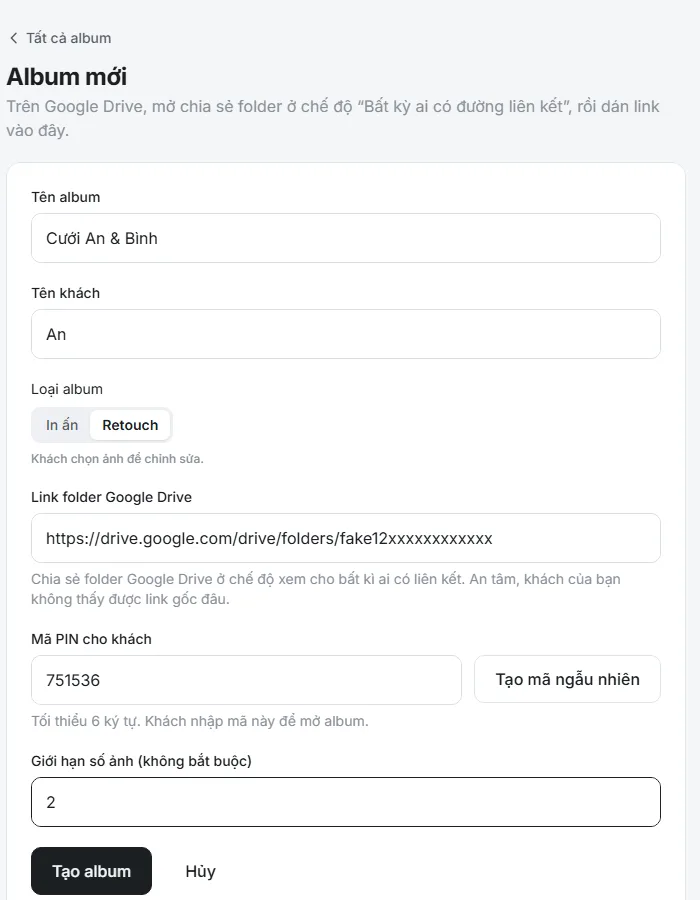
Sign up free, create an album and paste your Google Drive folder link. In the package size field, enter the number of frames the client may choose under the contract, for example 30 for a basic package. Use a separate PIN for each client.
Step 2: Pick the right album type
Each album is one of two types: Print when the client picks frames to be printed, and Retouch when they pick frames to be edited. The type appears on the PIN screen and in the PDF report, so both you and the client know what the choice is for.
Step 3: Clients see how many frames are left
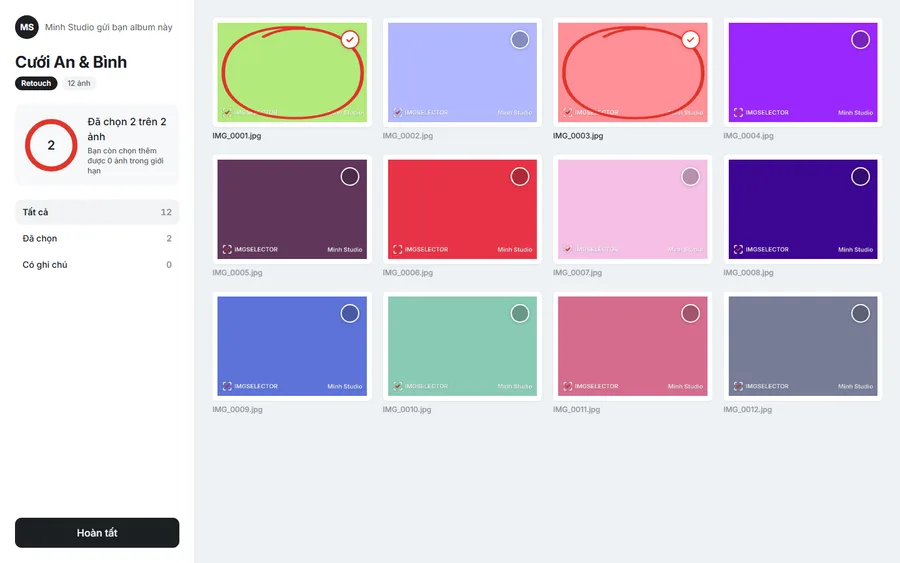
The client's screen always shows a counter of chosen photos against the package, with a line saying how many more they can pick. When they reach the limit the system warns them. They decide for themselves to drop one frame to pick another, and you do not need to remind them.
Step 4: When a client wants extra frames
Some clients want to buy frames beyond the package. You still see the full selection, including the extras, so you can quote the additional cost. If a client needs another round after submitting, press Reopen for client.
Step 5: Receive the list and start editing
When the client presses Done, export the PDF to get the file list and notes, and use the filter string to find the exact originals. See how to filter original files by filename.
Package size ideas by service
- Yearbooks: one album per student with a fixed number of frames, and different PINs so classmates cannot see each other's photos.
- Families: set the size to match the shoot package, plus a few spare frames.
- Portraits and headshots: a small album with a low limit, type Retouch.
- Prints: choose type Print and set exactly the number of frames in the product, for example a 20-page album.
Frequently asked questions
Can a client select more than the package?
Yes, but they get a warning once they go over. You see the full selection and decide how to handle it.
Does each client need a separate album?
It is best. Each album has its own link and PIN, so one client's choices never mix with another's.
Is IMGSELECTOR free?
Yes. Photographers can sign up and use IMGSELECTOR for free.