How to Filter Original JPG and RAW Files by the Filenames Your Client Picked
Your client has finished choosing, and you have a list of filenames. Now you need the matching originals, both JPG and RAW, inside a folder of thousands of frames. Typing them one by one is slow and easy to get wrong. This guide shows how to filter the whole list with a single paste into Windows Explorer.
What you need first
- The original folder on your computer still has the camera filenames (for example
IMG_0012.CR3andIMG_0012.JPG). - The client has pressed Done in IMGSELECTOR. You only see the selection after they submit.
- The album was created from a Drive folder whose filenames match the originals on your computer.
Step 1: Copy the filter string
Open the album in IMGSELECTOR and go to the Report tab. You will see a filter string such as IMG_0012 OR IMG_0045 OR IMG_0103. Copy the whole string. It contains only the name part, without the extension, so it matches every format that shares the name.
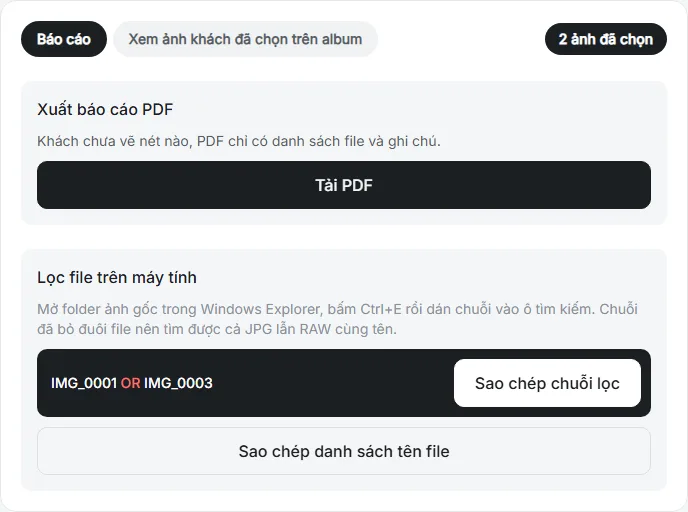
Step 2: Paste it into the Windows Explorer search box
Open the original folder on your computer, click the search box at the top right, and paste the string. Explorer shows only files with matching names, both JPG and RAW. If the folder has subfolders, Explorer searches them too.
Step 3: Copy the results to a new folder
Press Ctrl + A to select all results and copy them to a new folder, for example "Retouch". From here you work only with the frames the client chose, and your original folder stays untouched.
When the results look wrong
- Missing files: check whether the filenames on Drive were renamed compared with your computer. The names must match.
- More files than the client picked: usually each frame has both a JPG and a RAW, so the file count is double the frame count.
- Folder not indexed: on external drives, searching can be slow. Wait for Explorer to finish before selecting everything.
- Very long list: when a client picks many frames, IMGSELECTOR splits the filter string into groups with buttons such as Copy group 1 and Copy group 2. Paste each group into Explorer in turn and copy the results into the same folder.
Send notes to your retoucher
Press Download PDF to get the file list, text notes and the drawings your client made on the photos. Send the PDF together with the "Retouch" folder so your retoucher does not have to read the chat history.
Frequently asked questions
Does this work with RAW files?
Yes. The filter string contains only the name, so Explorer shows every file with that name, including RAW formats such as CR2, CR3, NEF, ARW and DNG.
What if I use a Mac?
The filter string is written for the Windows Explorer search box. On a Mac you still have the filename list in the PDF report to look files up.
Is IMGSELECTOR free?
Yes. Photographers can sign up and use IMGSELECTOR for free.