Replace Photo Selection over Chat Apps with a Single Selection Link
Many photographers still send a Drive link and wait for the client to message back frame by frame over Zalo, Messenger or WhatsApp: "third photo, second row", "the one with the white dress", "the one similar to the last". It is familiar, but slow and error-prone. This guide compares that approach with a PIN-protected selection link and shows what you save.
The problems with choosing photos over chat
- Clients describe, you guess. Screen positions differ between devices, so the client's "third photo" may not be your third photo.
- Messages scroll away. The selection is spread over several days and you scroll back to collect it.
- You never know if they are done. Clients keep adding and removing frames, so the final list is unclear.
- Typing filenames by hand. Even after you understand the client, you still type each name to find the originals.
- Going over the package. You only learn how far over they went when you recount.
The workflow with one selection link
- Create an album from your Drive folder. Sign up free, paste the folder link, set a PIN and the package size.
- Send the link and PIN over your usual chat app. You keep the channel you know and replace only the selection step. Clients need no account.
- The client taps photos to choose them. Chosen photos are circled in red and the filename is shown, so frames are never confused.
- The client presses Done. You receive one final list instead of rereading the conversation.
- Filter the originals. Paste the filter string into Windows Explorer to find the exact JPG and RAW files.
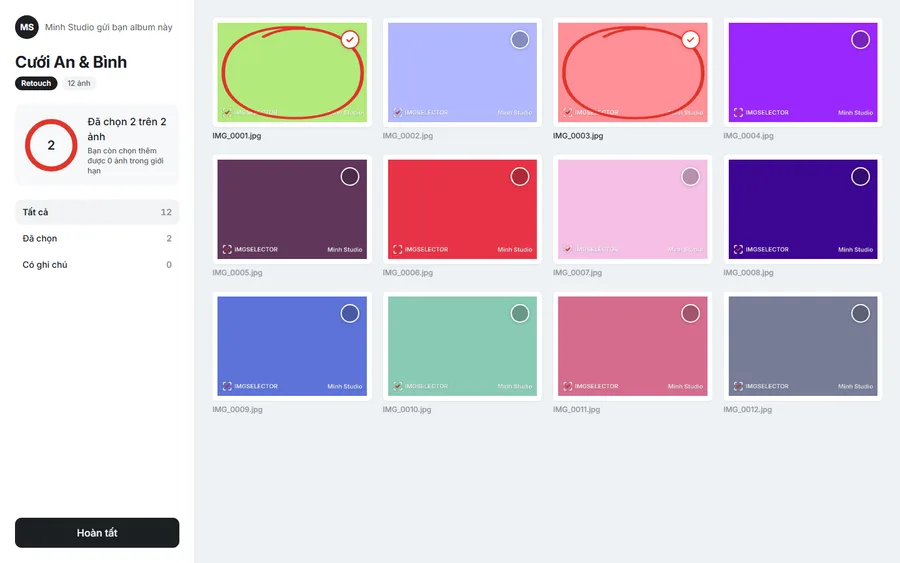
Quick comparison
| Over chat | With IMGSELECTOR | |
|---|---|---|
| Identifying chosen frames | Guessing from descriptions | By exact filename |
| Editing notes | Scattered through messages | Notes and drawings on each photo |
| Staying within the package | Manual counting | Counter and warning when over |
| Finding originals | Typing each name | Paste one filter string |
Keep chatting, cut the manual work
You do not need to teach clients a new tool. They open a link and enter a PIN. Everything else, such as pricing and scheduling, still happens in your chat app. The most time-consuming part, choosing and collecting the list of photos, is automated.
Frequently asked questions
Can older clients use it?
Yes. Clients just tap photos to choose them, with no Google sign-in or account. Older clients usually manage fine on a phone.
Does the client see my original Drive link?
No. Clients only see previews up to 1600px, and the originals stay on your Drive.
Is IMGSELECTOR free?
Yes. Photographers can sign up and use IMGSELECTOR for free.