How to Share a Google Drive Folder with the Right Permissions for Photo Selection
The most common problem when creating a photo selection album from Google Drive is a folder with the wrong sharing permissions: IMGSELECTOR cannot read the photos, or clients cannot view them. This guide walks through sharing a folder step by step on desktop and phone, and how to fix common errors.
Which permission is right
The folder must be shared as "Anyone with the link" with the Viewer role. Viewer is enough, and you never need to give clients edit access. Your originals stay on your Drive, and clients only see previews generated by IMGSELECTOR (up to 1600px).
Share on desktop
- Open drive.google.com and find the folder with your photos.
- Right-click the folder and choose Share.
- Under General access, change "Restricted" to "Anyone with the link".
- Check that the role next to it is Viewer.
- Click Copy link, then Done.
Share on your phone
- Open the Google Drive app and tap the three dots next to the folder.
- Choose Share, then General access.
- Change it to "Anyone with the link" with the Viewer role.
- Tap Copy link.
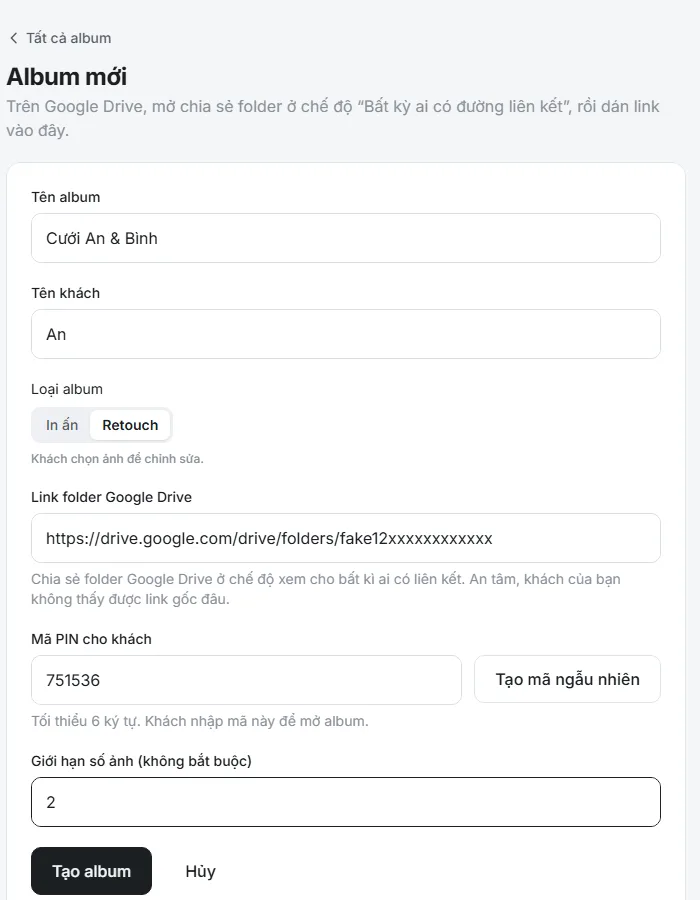
Paste the link into IMGSELECTOR
Sign up free, create an album and paste the folder link. The system reads the photo list in the folder and creates a separate link for your client. If you add photos to the folder later, press Resync from Drive to show the new ones.
Fixing common errors
- Folder cannot be read: check whether sharing is still "Restricted". Change it to "Anyone with the link".
- You pasted a file link instead of a folder link: the link must point to the folder that contains the photos, not to a single photo.
- The folder sits inside a restricted parent: share the photo folder itself, not only its parent.
- New photos do not appear: press Resync from Drive.
- Photos vanish after resyncing: you deleted or renamed them on Drive. The client's choices for those photos are lost too, so avoid renaming once clients have started choosing.
Keeping your photos safe
- The folder link is only used so IMGSELECTOR can read the photos. Clients receive the album link and PIN, not the Drive link.
- After you deliver the photos, you can set the folder back to "Restricted".
- Use one folder per client to avoid mixing photos.
Frequently asked questions
Do clients need edit access?
No. Clients do not open Drive. They view photos through the IMGSELECTOR album link. You only need the Viewer role for "Anyone with the link".
Can I use a personal Google Drive?
Yes. IMGSELECTOR works with a personal Google Drive.
Is IMGSELECTOR free?
Yes. Photographers can sign up and use IMGSELECTOR for free.